Microsoft Management Console (MMC) in Windows XP: A Foundational Tool for Web and Network Software Development
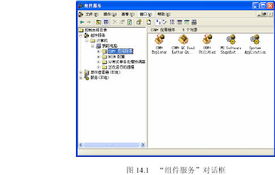
Microsoft Management Console (MMC) in Windows XP has been a pivotal management tool for system administrators, developers, and IT professionals. As a flexible framework, MMC allows users to create, save, and open administrative tools, known as snap-ins, which manage hardware, software, and network components of the Windows operating system. In the context of Windows XP, MMC played a key role in simplifying tasks related to web development and network software development.
For web developers working on Windows XP, MMC provided essential snap-ins like the Internet Information Services (IIS) Manager. IIS was Microsoft's web server, and integrating it with MMC enabled developers to configure websites, set up virtual directories, manage security settings, and monitor server performance efficiently. This integration was crucial for testing and deploying web applications locally before moving them to production environments. Developers could easily manage FTP sites, application pools, and ASP.NET settings through the user-friendly MMC interface, reducing the need for complex command-line operations.
In the realm of network software development, MMC in Windows XP offered snap-ins such as the Computer Management tool, which included Device Manager, Event Viewer, and Services. These components allowed developers to monitor system resources, troubleshoot network connectivity issues, and manage services that support network applications. For instance, developers could use the Services snap-in to start, stop, or configure services like DHCP Client or DNS Client, which are vital for network communication. Additionally, MMC supported custom snap-ins, enabling teams to build tailored tools for specific network software projects, such as monitoring network traffic or configuring firewalls.
Despite its age, MMC in Windows XP laid the groundwork for modern administrative tools in later Windows versions. It emphasized a modular approach, where developers could combine multiple snap-ins into a single console, enhancing productivity. For example, a web developer might integrate IIS Manager with the Certificate snap-in to handle SSL certificates for secure web applications. Similarly, network software developers could use the Group Policy Editor snap-in to enforce security policies across a network.
In summary, MMC in Windows XP was an indispensable tool for professionals in web and network software development. Its flexibility and integration capabilities streamlined administrative tasks, fostering a more efficient development workflow. As technology evolved, the principles of MMC influenced subsequent management tools, but its role in the XP era remains a testament to its effectiveness in supporting complex software projects.
如若轉(zhuǎn)載,請注明出處:http://m.23ppc.cn/product/47.html
更新時間:2026-06-19 22:51:33